
MINECRAFT JAVA EDITION 26.1: THE TINY TAKEOVER UPDATE
Posted byClubCraft Team•March 24th 2026
MINECRAFT JAVA EDITION 26.1: THE TINY TAKEOVER UPDATE
The first game drop of 2026 has arrived, and it is all about the little ones. Minecraft Java Edition 26.1, officially named Tiny Takeover, landed on March 24 with a massive visual overhaul to baby mobs, a brand new item that lets you keep them small forever, and a collection of technical changes that expand what is possible for servers and datapack creators alike.
Here is everything you need to know about this update and what it means for your experience on ClubCraft.
Baby Mobs Get a Complete Makeover
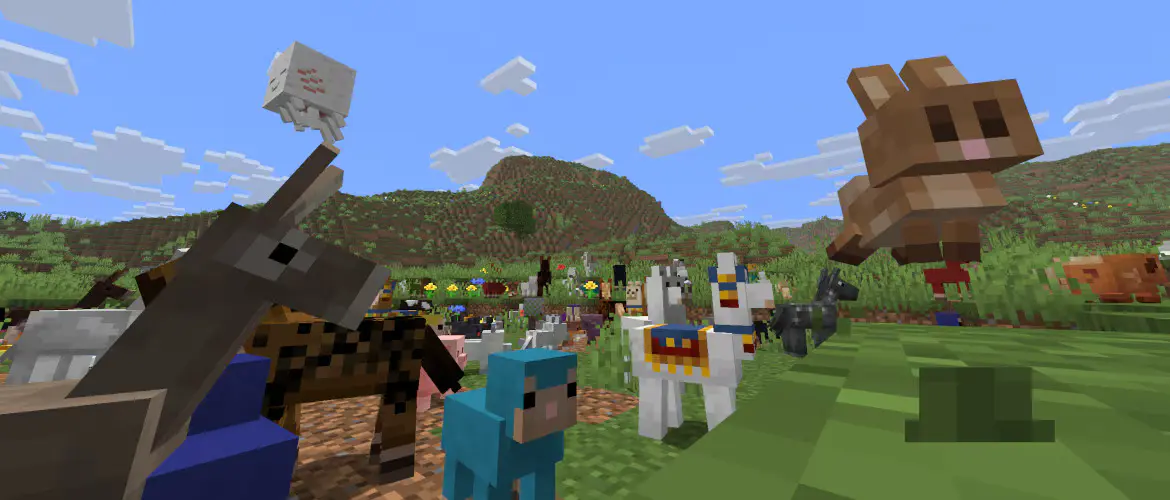
The headline feature of 26.1 is a sweeping redesign of nearly every baby mob in the game. Previously, most baby mobs were just shrunken versions of their adult counterparts. Now they have entirely new models and textures that give each one a distinct, younger appearance.
The list of affected mobs is enormous. Kittens, chicks, foals, piglets, puppies, baby cows, sheep, goats, foxes, bees, axolotls, dolphins, pandas, llamas, camels, armadillos, polar bears, turtles, squids, and even baby zombies, piglins, and villagers have all received unique baby models. Baby sniffers even got their own name: Snifflets.
Several baby mobs also received new sounds. Chicks, kittens, foals, piglets, and puppies now sound distinctly different from their adult versions, making encounters with them feel more alive. Baby axolotls have gained their own play dead animation, and baby goats will no longer ram players with their horns.
Every armor type has been updated with baby-specific textures as well, from leather and chainmail all the way through diamond and netherite. If you equip armor on a baby mob, it will actually look like it fits.
The Golden Dandelion
Alongside the baby mob redesign comes a new item: the golden dandelion. Craft one by surrounding a dandelion with eight gold nuggets, or pick one up from a wandering trader.
When you use a golden dandelion on a baby mob, that mob will stop aging entirely. It stays small and cute forever. Use it again to reverse the effect and let the mob grow up normally. The item works on nearly every baby mob in the game, with the exceptions being monsters and villagers, though baby hoglins are fair game.
For builders and base designers, this opens up a lot of creative possibilities. You can now have a permanent pen of tiny animals, a garden of baby axolotls, or a flock of chicks that never grow up. The golden dandelion can also be placed in a flower pot or used to craft yellow dye, so it fits naturally into the existing item ecosystem.
Craftable Name Tags
Name tags have always been one of those items you could only find in dungeon chests, fishing loot, or librarian trades. That changes in 26.1. You can now craft a name tag using any metal nugget and a piece of paper.
This is a small but meaningful quality-of-life improvement, especially on servers like ClubCraft where players often want to name pets, protect mobs from despawning, or label animals in their farms. No more relying on luck to find them.
New Trumpet Sounds on Note Blocks
Note blocks placed on copper blocks now produce a trumpet sound, and the tone changes depending on the oxidation level of the copper. This gives musicians and redstone engineers a new instrument to work with and another reason to stockpile copper.
Stonecutter Improvements
The stonecutter received some useful new recipes. You can now cut deepslate directly into cobbled deepslate, polished deepslate, deepslate bricks, and deepslate tiles without intermediate steps. Stone can also be cut directly into cobblestone variants. These changes streamline building workflows and reduce the number of crafting steps needed for common decorative blocks.
The /swing Command
A new command has been added for mapmakers and server operators. The /swing command triggers arm-swinging animations on any entity. The syntax is simple: /swing <entity> <mainhand|offhand>. This may seem niche, but for adventure maps, cutscenes, and custom server content, it adds a layer of polish that was previously difficult to achieve.
Data-Driven Villager Trades
One of the biggest technical changes in 26.1 is the move to fully data-driven villager trades. Server operators and datapack creators can now define custom villager trades through datapack files, specifying exactly what villagers want, what they give back, how many times a trade can be used, and what conditions must be met. This level of control opens up possibilities for custom economies, quest systems, and unique server experiences.
World Clocks and Dimension Time
Each dimension can now have its own independent time tracking. The End dimension's clock now controls the dragon death flash effect, and the /time command has been updated to work with per-dimension clocks. This is a subtle but powerful change for servers running custom dimensions or adventure content.
Technical Highlights
Beyond the features players will notice immediately, 26.1 introduces several important technical changes:
- Java 25 required. This is the first release to require Java SE 25, so make sure your installation is up to date.
- Fully unobfuscated. For the first time, a Java Edition release ships without any obfuscated code, making it easier for mod developers to work with the game.
- New version format. Mojang has adopted a year.drop.hotfix numbering system, which is why this release is called 26.1 rather than following the old 1.x naming convention.
- New block and item tags. Dozens of new tags have been added for vegetation support, crop placement, dye handling, and more, giving datapack creators finer control over game mechanics.
- Environment attributes. New visual attributes let datapack creators control block light tint, ambient light color, and night vision color per dimension.
Connect to play.clubcraft.net and see the Tiny Takeover for yourself.

HOW TO JOIN
Launch Minecraft(Java Edition)
Click Multiplayer, then click Add Server
Copy/paste our IP address:
Click Done, then click Join — see you soon!